The 3-2-1 backup rule for photographers
The card failed.
That is where the story always starts, and it is never actually a story about the card. Cards fail at a rate you can look up, and the rate is low enough that you will go years without it happening and then have it happen on the one Saturday that cannot be reshot. The card is the trigger. What determines how the day ends is the thing you set up months earlier and have not thought about since.
None of what follows is clever. It is the boring, well-known discipline that every photographer agrees with in principle and a surprising number of us have quietly let slip.
What 3-2-1 actually means
Three copies of every file. On two different kinds of media. One of them offsite.
Read carefully, because each number is doing separate work:
- Three copies — the original plus two backups. Not one backup. Two, because the scenario you are defending against is not "a drive failed", it is "a drive failed while I was restoring from the other one", which is a real and unglamorous way to lose a wedding.
- Two media types — not two of the same drive bought the same week. Drives from the same batch fail in correlated ways, and two SSDs in the same enclosure share a power supply, a controller, and a room. Mix the mechanisms.
- One offsite — because fire, theft, flood, and a spilled drink do not respect the distinction between your working drive and the backup drive sitting next to it. Offsite means a different building. Cloud counts. A drive at your parents' house counts. A drive in your car does not.
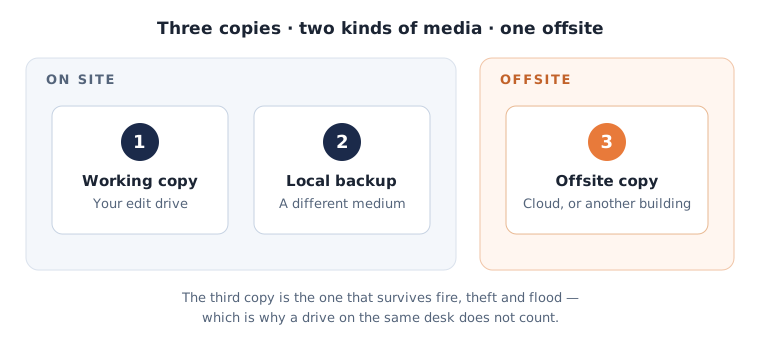
That is the entire rule. It has not needed revision because the failure modes have not changed.
Where a wedding workflow actually breaks
The rule is easy. The gap is always in the hours between the shutter and the archive — and for weddings, that gap is the most dangerous window in the job, because it is exactly when you have one copy of something irreplaceable.
The drive home. From the last dance until you offload, your entire day lives on cards in a bag. If your camera has dual slots, write to both; that is a second copy for free and it is the single highest-value change most photographers can make. If it does not, the cards do not go in the same pocket, and they do not leave your person.
The offload. Copy, verify, then format. The verification step is the one that gets skipped, and a copy that reported success but wrote a truncated file is indistinguishable from a good one until the day you open it. Use software that checksums. Then leave the cards full until the job is delivered and backed up — storage is cheaper than the alternative, and a formatted card is a copy you chose to destroy.
The edit. Your working catalogue is a copy, not a backup, because every mistake you make propagates to it instantly. A delete is a delete. A bad batch edit is a bad batch edit. Backups protect against your own hands as much as against hardware, which is why versioned or snapshot-based backups beat a mirrored folder that faithfully replicates your error.
The long tail. The job ships, the client is happy, and the backup discipline that was tight in week one goes soft in month six. The archive copy that was never made is the most common failure in this entire list, and it fails silently, which is the worst property a failure can have.
Your delivery platform is not your backup
This one is worth saying plainly, and it is worth saying about us too: your delivery platform is not your backup. Ours included.
A gallery host is built to serve images to clients — reliably, quickly, at the resolution and with the watermark you chose. That is a delivery job, and the copy it holds is a derivative: exports, sized and processed for clients, usually not your masters, and governed by whatever expiry policy you set. When a gallery expires, that copy is meant to go away. That is the feature working.
Treating it as your third copy means your archive quietly depends on a retention policy designed for something else entirely. The same goes for the client's own downloads, your Instagram uploads, and the WeTransfer link from March.
Delivery and preservation are different jobs. Keep them in different systems on purpose.
The slide everyone skips
A backup you have never restored from is not a backup. It is a hope.
Restore testing is the step with no immediate payoff, which is why almost nobody does it, which is why it is the step that separates people who have backups from people who believe they have backups. The gap between those two groups is discovered at the worst possible moment, and by then it is not fixable.
It does not need to be elaborate. Once a quarter, pick a job at random from six months ago. Restore it from your offsite copy — not your local one — to a scratch folder. Open five files. Confirm they are the right files, at the right resolution, not truncated, and that you still have the credentials and the software to read the format.
Twenty minutes, four times a year. That is the whole discipline.
A setup that holds
For most working photographers, the durable version looks like this:
- In-camera: dual-slot write on every paid job.
- On offload: copy to your working drive and a second local drive, verified by checksum, before any card is formatted.
- Offsite: an automated cloud or remote sync that runs without you remembering to run it — manual offsite backup is the same as no offsite backup by month three.
- Archive: once delivered, masters move to long-term storage that is not your delivery platform, on a schedule, not a whim.
- Quarterly: one restore test from the offsite copy.
Nothing here is expensive relative to one lost wedding, and nothing here is interesting. That is rather the point. The photographers this never happens to are not lucky; they are running a boring system they set up before they needed it.
While you are thinking about what lives where, it is worth separating the archive question from the delivery question entirely — how long galleries should stay live is a policy decision, and how much storage you actually need depends almost entirely on the answer.
Tobren Deliver is where your clients collect their images — a delivery surface, deliberately not an archive. More articles.